Git repository, Commits and Branches:
I primarily use Git as a backup for my own website stuff. But besides that it is a convenient backup, it can also be used to track changes on a project, or easily work with multiple people on the same project. An example of this is the Git of the group project.
Portfolio Git repo
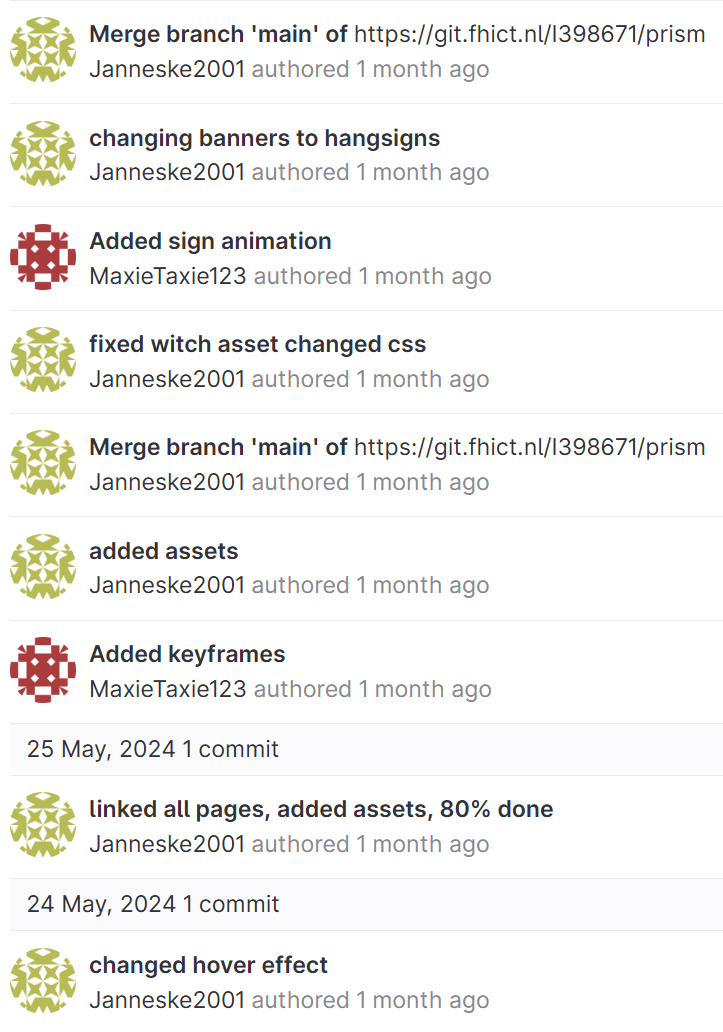
In this group project, I was mainly active in the development of the final product. So when I got to work on the HTML and the CSS, I kept pushing my changes. With every push I did to the server, I needed to give the commits sensible descriptions. This way, if something would turn out to not go so well, we can backtrack when I worked on what element. I haven't really worked on branches yet, as we as a group agreed that when I needed to work on it they didn't have things they wanted to do on it. I did call in the help from Max for a couple animations, which he implemented in the CSS, pushed, and then I “merged” my version with his. But as our changes were many lines apart, there were no merge conflicts and everything merged properly.
In this group project, I was mainly active in the development of the final product. So when I got to work on the HTML and the CSS, I kept pushing my changes. With every push I did to the server, I needed to give the commits sensible descriptions. This way, if something would turn out to not go so well, we can backtrack when I worked on what element. I haven't really worked on branches yet, as we as a group agreed that when I needed to work on it they didn't have things they wanted to do on it. I did call in the help from Max for a couple animations, which he implemented in the CSS, pushed, and then I “merged” my version with his. But as our changes were many lines apart, there were no merge conflicts and everything merged properly.